
Installation
Getting Scriptable Values up and running in your Unity project is really easy! First you just need to pick how you want it to be installed.
Install via OpenUPM (recommended)
Section titled “Install via OpenUPM (recommended)”There are two ways to install Scriptable Values via OpenUPM: using the OpenUPM CLI or using the Unity Package Manager.
With OpenUPM CLI
Section titled “With OpenUPM CLI”If you have OpenUPM CLI installed, you can run the following command in your Unity project:
openupm add se.hertzole.scriptable-valuesWith Unity Package Manager
Section titled “With Unity Package Manager”- Open
Edit > Project Settings > Package Manager - Add a new
Scoped Registry(or edit an existing OpenUPM entry)
Name:package.openupm.com
URL:https://package.openupm.com
Scopes:se.hertzole.scriptable-values - Click
SaveorApply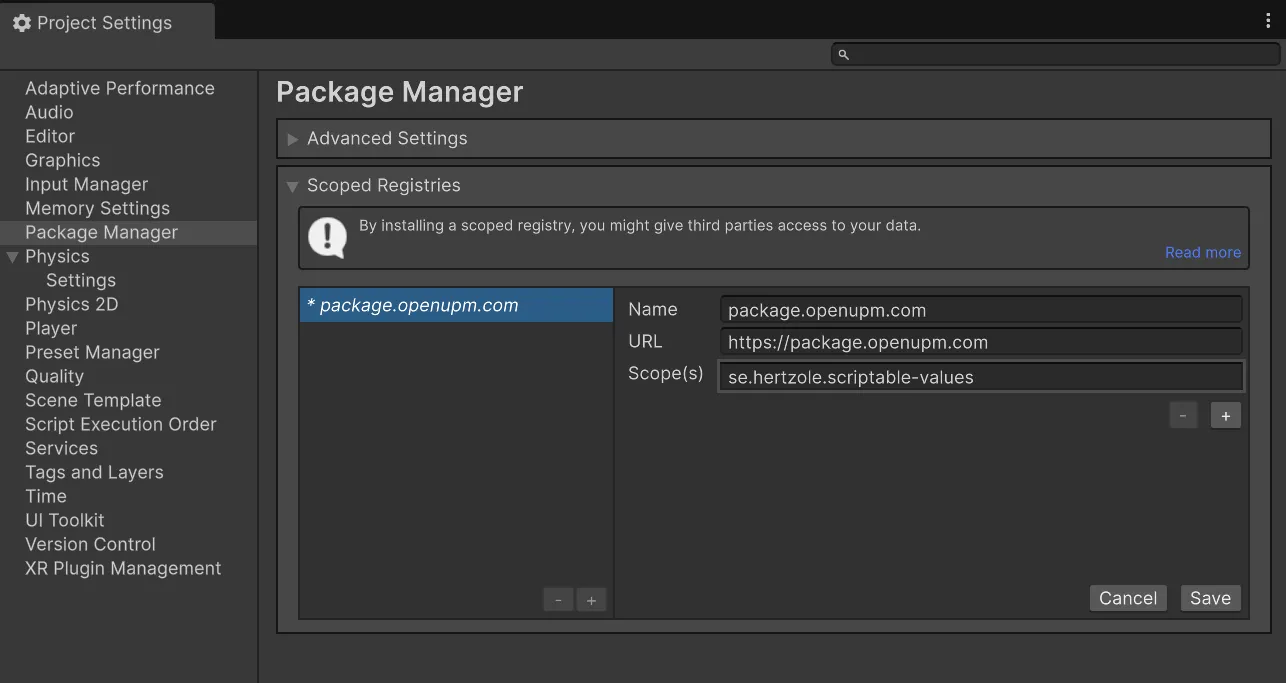
- Open
Window > Package Manager - Click the
+button in the top left corner and selectAdd package by name...orAdd package from git URL... - Enter
se.hertzole.scriptable-valuesand clickAdd
Install via Git URL
Section titled “Install via Git URL”You can also install Scriptable Values via Git URL. This is a good option if you want to use the latest version of Scriptable Values, but it is not recommended for production projects.
-
Open
Window > Package Manager -
Click the
+button in the top left corner and selectAdd package from git URL... -
Paste in the decired URL and click
Add
For the latest stable version:https://github.com/Hertzole/scriptable-values.git#packageFor the latest preview (but unstable!) version:
https://github.com/Hertzole/scriptable-values.git#dev-package -
Wait for the package to be installed